
Welcome to Calico Connect
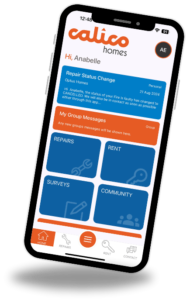
Sign up for Calico Connect and experience the convenience of managing your home from your fingertips!



Register for the App today
Login/Activation Page
- Once you’ve registered, you will receive an email from no-reply@calico.org.uk containing the
app download link, and the app activation code. - Download “Calico Connect” app from AppStore or PlayStore.
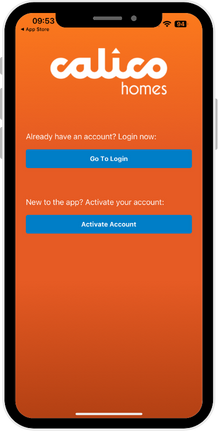
- If this is the first time using the app, you will need to activate your account
before logging in. Select “Activate Account”. For help activating your
account, please scroll to the next page. - If you have already activated your account, select “Go To Login” and
proceed to log in using your email and password.
Activating your Account
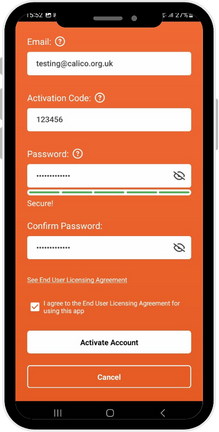
- Enter the email address that we sent your Activation Code to.
- Enter your activation code which was included in the invitation email that
we sent to you. - You must now set a strong password.
Logging In
- Once you have activated following the above steps, you will then be able to
log-in to the app with your email & password.
Setting your Password
Your password should be:
- Be between 8-64 characters long
- Have at least one special character
- Have at least one capital letter
- Have at least one number
- Password must reach five green bars on the password strength
meter
Frequently Asked Questions
Why haven’t I received my activation email?
- Please check your email Junk/Spam folder
- Ensure you are checking the correct email account
- You will not receive a new activation email if you have previously activated. Please go ahead and log in.
Why is my activation code not working?
- Check you are on the activation screen, by pressing the ‘Activate Account’ button
- Make sure the activation code is typed in, correctly
- Check the email address being used is the same one that the activation code was sent to
- Check the password meets the minimum strength requirements
What do I do if I can’t remember my password?
- Please use ‘Forgot Password; to reset your password.
- You will also need to re-activate your account, so we will send you a new activation code via email.
I don’t have a smartphone, how can I access my online account?
- We do have a web version available. You can access via connect.calico.org.uk
- It is the same activation and login process as outlined in this welcome pack